Automations
Fil answers comments and DMs with your link, replies on YouTube, posts on a schedule and runs agents at set times. How each automation works.
Automations are things Fil does for you while you're away: answer every comment that has your keyword with a reply and a DM carrying your link, answer DMs and story replies, reply on YouTube, post at the time you pick, or have a canvas's agent work on a schedule. You set one up once, and it runs until you pause it. Automations and the Inbox come with Pro and Max: if your plan ends, your live automations pause, and you turn on the ones you want once you're on Pro or Max again.
How a comment becomes a DM
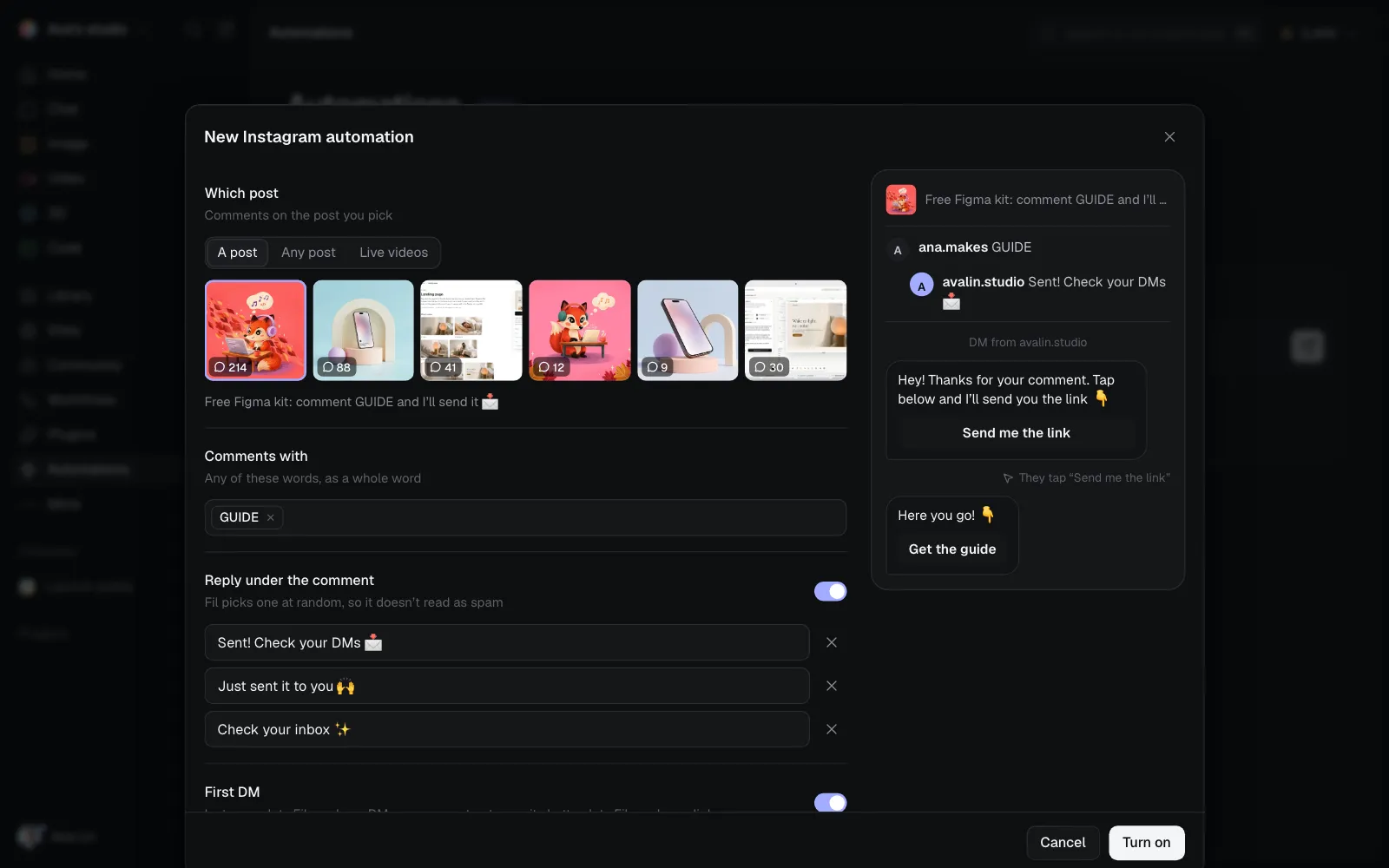
- Someone comments your keyword, like GUIDE, under your post.
- Fil replies under the comment, one of up to three wordings at random so Instagram doesn't read it as spam.
- Fil sends them a first DM with a button, such as Send me the link. Instagram lets a business send one DM per comment.
- They tap the button. On Instagram's website, where DMs show no buttons, any reply counts as the tap.
- Fil sends the DM with your link. A long one goes in parts.
Fil hears about comments, DMs and taps the moment they happen, and checks each live automation's post once a minute as well, so nothing is missed.
Popular automations
| Automation | When | What Fil does |
|---|---|---|
| Send a link to commenters | Someone comments your keyword on a post | Replies under it and DMs your link |
| Schedule a post | The time you pick | Posts a canvas's post node to X, Threads, LinkedIn, Instagram, TikTok, YouTube or Vimeo |
| Answer DMs with a keyword | Someone DMs your keyword | Sends your link back at once, once a day per person |
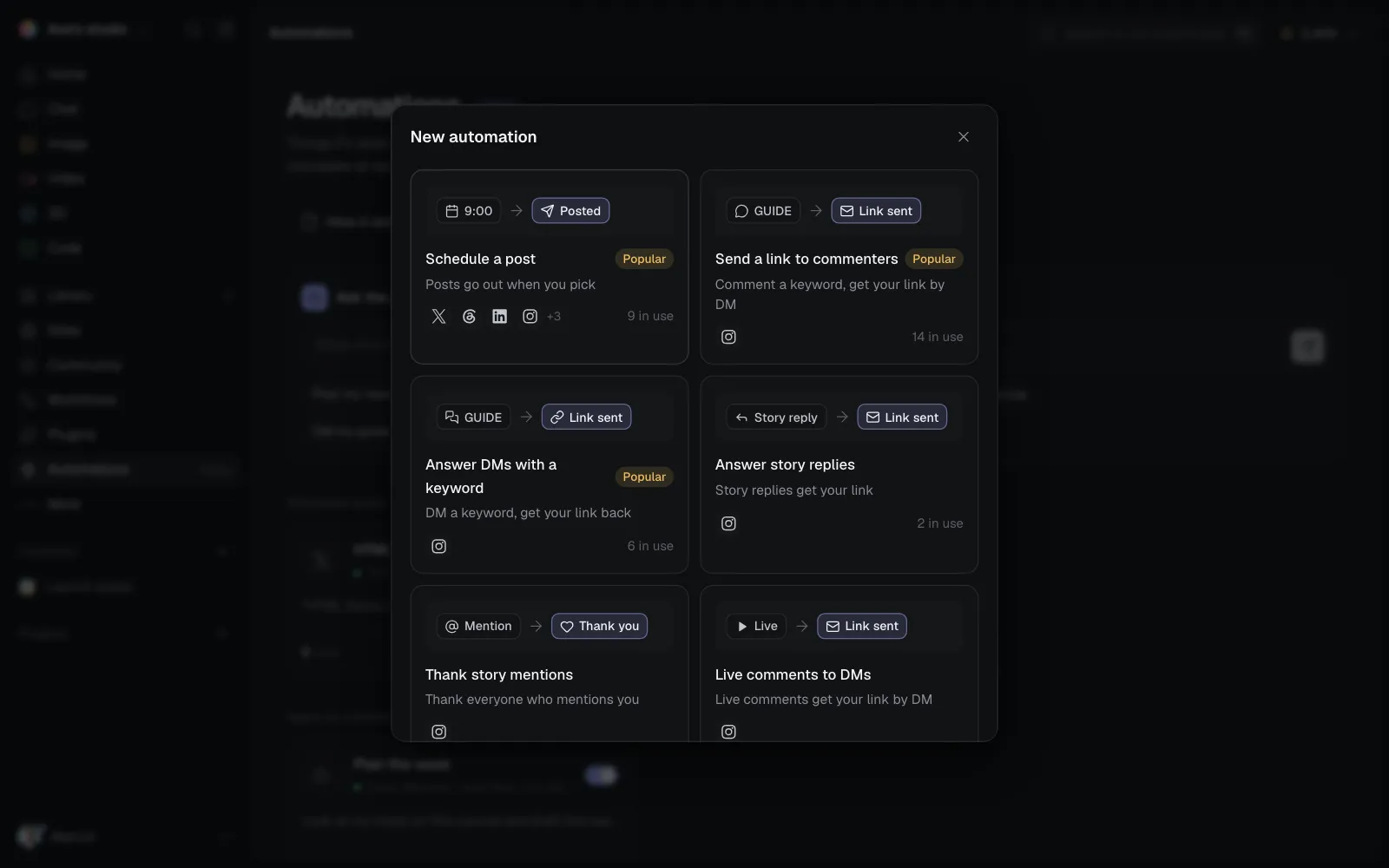
The most used ideas are marked Popular, and each shows how many automations on Fil use it.
Set one up
- Open Automations in the sidebar and click New automation.
- Pick an idea, like Send a link to commenters.
- Pick the post, type your keywords and press Enter after each.
- Write the reply under the comment, the first DM and its button, and the DM with your link. Links can go in the DM's words, on up to three buttons, or both.
- Click Turn on. The preview on the right shows what the person who comments sees, step by step.
You can also ask the agent at the top of the page, like "DM my guide to everyone who comments GUIDE on Instagram", and turn on what it proposes.
Posting from Fil? Turn on Auto-DM commenters in the post's Publish tab, on Instagram: the keyword, link and DM are right there, and More options has everything above. Upload files puts the files you want to share in a Drive beside the post, each on its own download button.
Ask them to follow, or for their email
Two optional steps go before the link:
- Ask them to follow first: anyone who doesn't follow you is asked to, with a button they tap once they have.
- Ask for their email: they can type it or skip. Emails are kept in Contacts, which you can download as a CSV.
More kinds
- Answer story replies and Thank story mentions: a DM to people who reply to your story with your keyword, or who mention you in theirs.
- Live comments to DMs: your link by DM to everyone who comments your keyword while you're live.
- Reply to YouTube comments: a public reply to comments with your keyword. YouTube has no DMs, and links in Shorts' comments can't be tapped, so point people to your channel.
- When a new video goes up: Fil comments under it, adds it to a playlist, translates its title and description, or asks a canvas's agent to make Clips.
- Answer TikTok DMs: your message back to everyone who DMs you your keyword, once a day each. TikTok lets a business answer only people who write first.
- Reply to TikTok comments: a public reply to comments with your keyword, like "DM me THREEJS and I'll send it". TikTok doesn't let apps DM someone who only commented. Connect TikTok Business in Plugins first.
- Guard your comments: Claude hides spam and scams and answers questions from what you tell it. It costs about a credit per batch of comments.
- Plan the week, Daily recap and Weekly numbers recap: a canvas's agent at a set time, paid like a chat reply.
See what it did
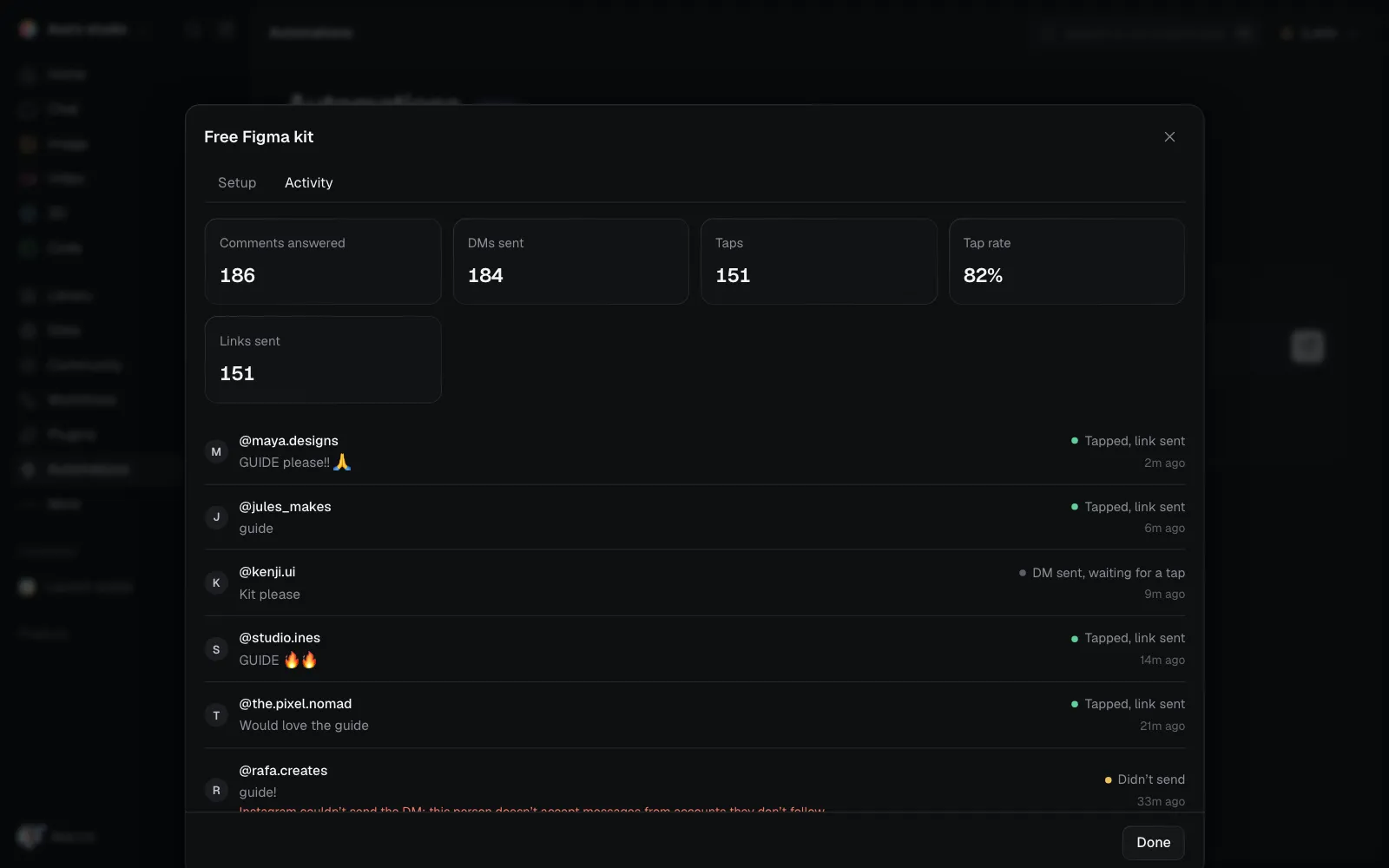
Open an automation and click Activity: every comment it answered, whether the DM went out, whether they tapped, and why anything didn't send. A card's tapped share is how many people who got the first DM tapped its button.
The Inbox
Inbox in the sidebar has the DMs people send your Instagram accounts, in one place: the ones your automations started and the ones people send you. Filter by unread, open, done or starred, label people, and reply. Instagram lets you answer within 24 hours of someone's last message.
Instagram's limits
- Only Instagram professional accounts (Business or Creator) can have automations, and Instagram must allow Fil to answer comments and send DMs (Reconnect in Plugins if it asks).
- One DM per comment until the person taps or writes back; after that, Fil has 24 hours to send the rest.
- Fil sends up to 200 DMs an hour per account, under Instagram's spam limits; comments past that wait for the next hour.
- An automation answers only comments made after it was turned on.