MCP tools
Every tool in Fil's MCP server for Claude Code, Codex and Cursor: what each does, its inputs, which spend credits, and the upload limits.
Fil's MCP server gives a connected agent 35 tools. You don't call them yourself: you ask in plain words, and the agent picks the tools and fills in their inputs. Reading and building is free; generate, edit_image, turn_into_skill and captions made with edit_video spend credits, never more than the max_credits they're given. This page walks through a short session, then lists every tool, what it does and its main inputs.
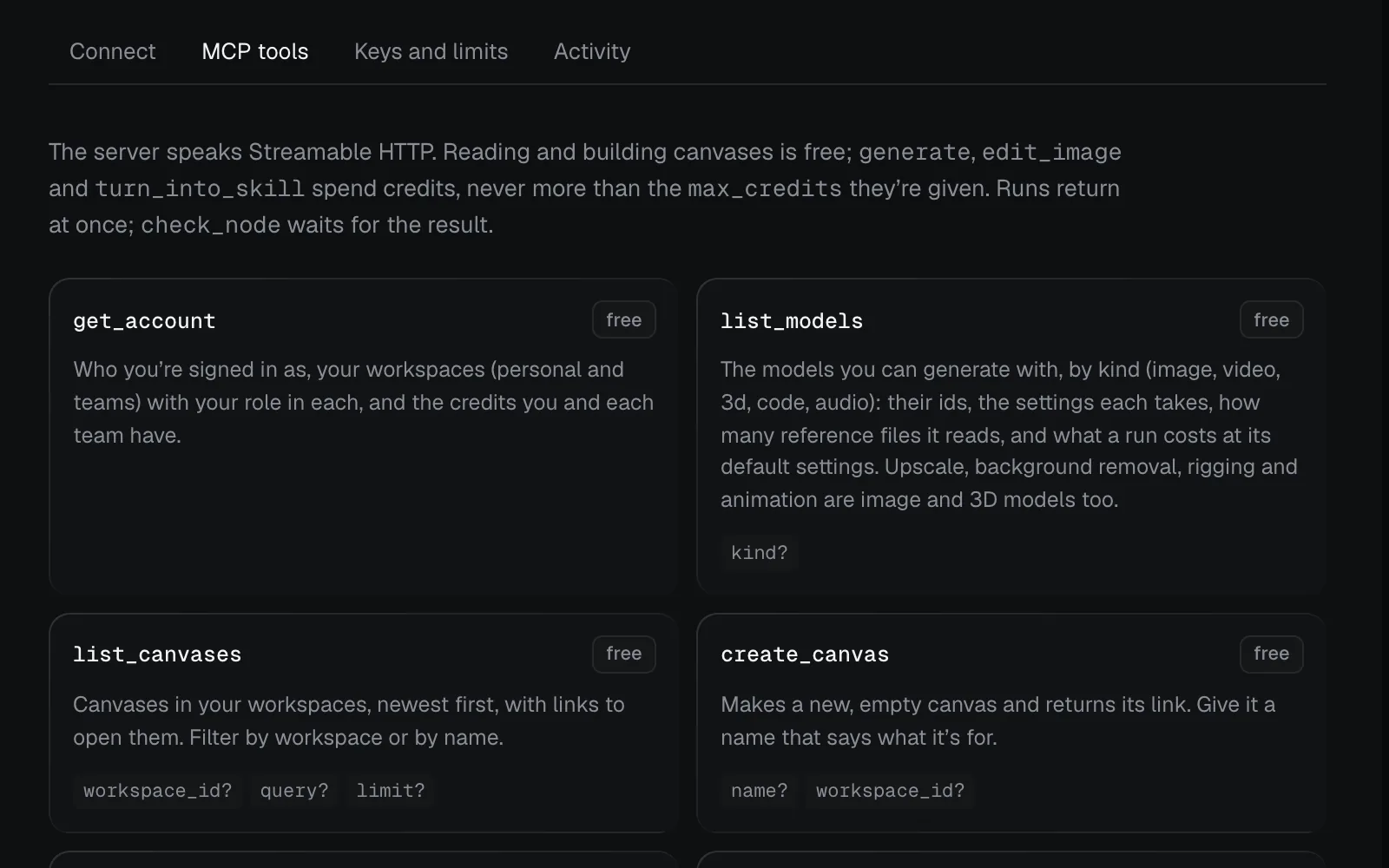
To see the list in Fil, click Agents in the sidebar (open Agents), then MCP tools. Each card says free or credits, and lists its inputs. edit_video's card says free: only the captions it makes cost credits. To connect an agent first, see Connect an agent.
Example: generate an image and a video from Claude Code
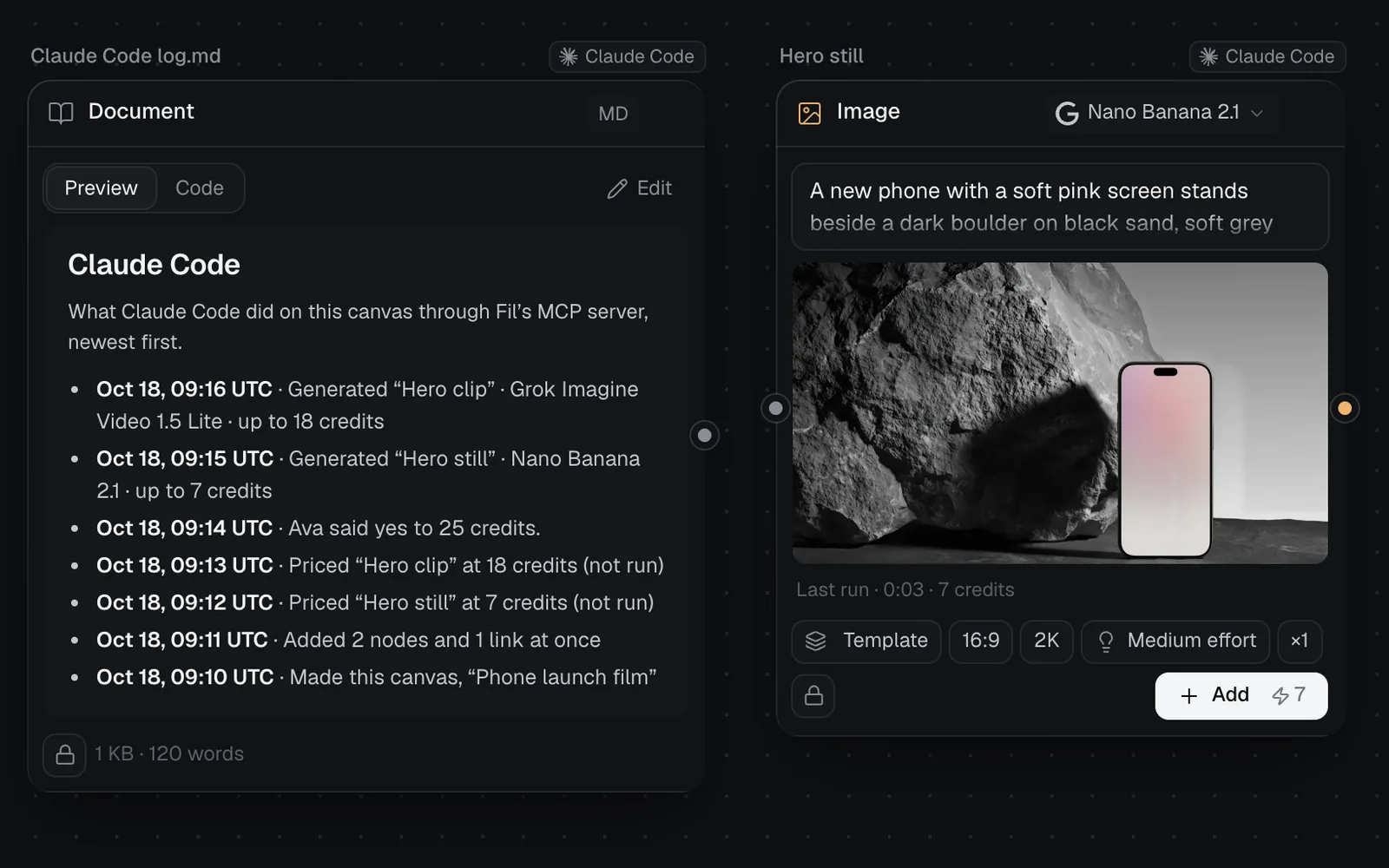
You ask Claude Code: "Make a canvas called Phone launch film. Make a 16:9 hero still of our phone beside a dark boulder, then a 5-second clip from it: a slow push-in as the word Introducing fades in. Tell me the price first." It works through the tools like this:
create_canvaswith the name. The agent gives you the canvas's link; open it to watch.add_nodesputs down two nodes and the link between them in one call: an image node, Hero still (Nano Banana 2.1, 16:9, with its prompt), and a video node, Hero clip (Grok Imagine Video 1.5 Lite, 720p, 5 seconds), fed by the still. Nothing runs yet.generateon each node withmax_credits0 returns the price without running: up to 7 credits for the still and 18 for the clip, as each node's Generate button shows too. The agent tells you, in words like "The still is up to 7 credits and the clip up to 18, 25 in all. Shall I run them?"- You say yes.
lognotes it on the canvas. generateruns the still withmax_credits7, andcheck_nodewithwaitreturns it when it's done, with a preview the agent looks at.generateruns the clip withmax_credits18, starting from the still, andcheck_nodewaits for it again. The agent gives you its link.
Each change, price check and note is a line in Claude Code log.md beside the nodes, newest first, and under Agents › Activity. Calls that only read, such as check_node, leave no line. The two runs cost at most 25 credits; each charges what it really used when it settles.
Other things to ask for
Each group of tools below answers requests like these:
| You ask | The agent uses |
|---|---|
| "Put these three product photos from my desktop on the canvas" | upload_file, then add_file for each |
| "On the Kinfolk site, change the jasmine tea's price to $14" | get_site, then set_data |
| "Make the site's accent colour sage green" | set_variables on its design system |
| "Cut the three shots into a 15-second video with a title, and export it" | make_video, edit_video, then export_video |
| "Make every node on this canvas private" | set_visibility |
| "Turn this flow into a skill I can reuse" | turn_into_skill, then check_node for the SKILL.md |
Fil MCP tools list
Every tool that works on a canvas takes its canvas_id, from list_canvases or create_canvas, so the tables leave it out. Node ids come from get_canvas, and file ids (asset_id) from search_library or an upload. An input with a ? is optional.
Account and models
| Tool | What it does |
|---|---|
get_account | Who you're signed in as, your workspaces with your role in each, and the credits you and each team have. |
list_models | The models you can use, by kind: their ids, settings, how many reference files each reads, and a run's price at its default settings. Inputs: kind?. |
Upscaling, removing a background, rigging and animating are image and 3D models in the list too.
Canvases and the library
| Tool | What it does |
|---|---|
list_canvases | Your canvases, newest first, with links. Inputs: query?, limit?, workspace_id?. |
create_canvas | Makes an empty canvas and returns its link. Inputs: name?, workspace_id?. |
get_canvas | Every node with its settings, status, runs and outputs, the links, sections, and which nodes are private. |
search_library | Library files by words in their name or prompt, with links and ids. Inputs: query?, kind?. |
log | Adds a line to the agent's log on the canvas: what you asked for, a decision, what's next. Inputs: text. |
kind is image, video, 3d, code or audio (and pdf for the library). Agents read get_canvas before they change a canvas, since people may have changed it.
Nodes, links and sections
| Tool | What it does |
|---|---|
add_prompt | A prompt node, wired into the nodes it feeds. Inputs: text, into?. |
add_document | A Markdown or text document (a brief, notes, copy) that goes along as reference text; it can show library pictures. Inputs: name, text, into?. |
add_skill | A skill (a SKILL.md) as a document node; wired into a node, it guides that run. Inputs: name, description, instructions, into?. |
add_node | A generation node with its model and settings, waiting; returns its price when it has a prompt. Inputs: kind, prompt?, inputs?, model?. |
add_nodes | Up to 60 nodes and 120 links in one call, each node with a ref the links can point at. Inputs: nodes, links?. |
connect | Links one or more nodes (from, up to 16) into one node (to): a prompt, document, skill or file into a generation node, or a result into the next node. Inputs: from, to. |
update_node | Changes a node for its next run, or renames, re-icons, resizes or moves a section. Inputs: node_id, then what to change: text?, prompt?, model? and settings, name?, note?, x?, y?, width?, height?, icon?, visibility?, pick?. |
remove_node | Removes a node and its links; its results stay in the library. On a section, only the frame goes. Inputs: node_id. |
add_section | A named frame around nodes, or an empty one, with an icon: a preset or a picture such as a logo. Inputs: name?, node_ids?, icon?. |
update_node changes a node's text, prompt, model, settings, name, note, place, size or visibility; pick sets which of its results feeds the next node. The settings add_node, add_nodes, update_node and generate take are the ones in Fil's own menus, and list_models gives the values each model takes:
| Setting | Values |
|---|---|
aspect_ratio | Pictures and video: 16:9, 1:1, 9:16, 4:3… |
resolution | Pictures 1k, 1.5k, 2k or 4k; video 480p, 720p, 768p, 1080p, 2k or 4k; 3D standard or detailed (Tripo), or 2k or 4k (Meshy): each model takes some of these |
count, quality | Pictures: how many, 1, 2 or 4 (another number makes 1); and low, medium or high on GPT Image 2.5 and Ideogram 4.5 |
duration | Video and sound, in seconds |
sound | Kling 3.0: off makes a silent clip, a third cheaper below 4K |
voice | Speech: one of the model's voices |
loop, prompt_influence | Sound effects |
rigging | 3D: off, rig, or rig and animate |
format | Code: site (the default), website, react, slides, svg, three, calendar, tasks, post and more |
effort | Code: how hard the model thinks, low, medium, high, xhigh or max |
The tools that add a node (add_prompt, add_document, add_skill, add_file, add_node, add_nodes, make_video) and update_node also take note, a short note shown under the node (up to 500 characters), and x and y, where it goes; left out, it goes beside what it connects to. generate takes neither.
Calendars, task lists and social posts are code nodes with the format calendar, tasks or post; agents read and write them with read_file and write_file.
Files and uploads
| Tool | What it does |
|---|---|
add_file | Puts a library file, or a file from a public link, on the canvas. Inputs: asset_id? or url?, into?. |
upload_file | An address for files on your computer, sent with curl, good for an hour; each lands unchanged in your library. Inputs: none besides the canvas. |
add_file takes a picture, sound, video or GLB model from a public link and saves it to your library first. After an upload, add_file puts the file on the canvas. A GLB model shows as a 3D model you can turn; a sound plays on the canvas and can be wired into an audio node or a prompt.
Generate, edit and check
| Tool | What it does |
|---|---|
generate | Runs a node, or adds a prompt and a node and runs them, as Generate does; 0 credits returns the price. Inputs: node_id? or kind and prompt, max_credits, payment?. |
edit_image | Edits a picture from a described change ("make the sky stormy"). Inputs: node_id, prompt, max_credits. |
turn_into_skill | Writes a SKILL.md from the flow that led to a node, on Claude Sonnet 5.5, so the work can be made again. Inputs: node_id, max_credits. |
check_node | Whether a run is going, failed or done, with its outputs and previews. Inputs: node_id, wait?. |
edit_imageadds an Edit node fed by the picture and runs it, on Nano Banana 2.1 unless amodelis given.- Runs return at once and show live on the canvas. A run sets aside its top price and refunds the rest when it's done; a run that fails or is blocked is refunded in full.
paymentis your own credits or the team's; on a team canvas, the team pays when it has credits.generateandedit_imagetakevisibility. Left out, a new node on Starter, Pro or Max is private, and an edit follows its picture.
Websites and React apps
Each tool here takes the node_id of the page, design system, data or app it works on; get_site takes any node of the site, or none for every site on the canvas.
| Tool | What it does |
|---|---|
get_site | A site as Fil keeps it: its pages (address, links, components, data lists), its design system and its data. Inputs: node_id?. |
read_file | The text of a page, design system, site data, skill, calendar, task list or post, or a document's whole text. Inputs: node_id. |
write_file | Saves a new version: the whole text, or edits that each replace text found once in it. Inputs: node_id, text? or edits?. |
set_data | Changes site data as a CMS does: set a field (such as a product's price), add or remove entries. Inputs: node_id, set?, add?, remove?. |
set_variables | Sets CSS variables (colours, fonts, text styles, spacing) on a design system, which every page follows, or on one page. Inputs: node_id, variables. |
set_component | Adds or changes a design system component's markup and CSS; every page using it follows. Inputs: node_id, key, markup?, css?. |
set_module | Adds, changes or removes one module of a React app (a component, page or stylesheet) by its path. Inputs: node_id, path, code?. |
add_page | Adds a page linked into the site's navigation: blank, a duplicate of a page, or one to make with generate. Inputs: node_id, name, mode?. |
Every change is a new version, free, and every page using what changed follows at once. Agents can build and edit sites but can't publish them: you click Publish (see Publish a website). See also Dynamic websites with data and React apps.
Video edits
| Tool | What it does |
|---|---|
make_video | A Video edit node from canvas nodes: videos, pictures and HTML scenes in order, sounds under them, prompts' words over them. Inputs: node_ids?, shape?. |
get_video | An edit's shape, length, lanes and every clip, and its captions as a list or as an SRT or WebVTT file. Inputs: node_id, captions?. |
edit_video | Changes an edit with commands, in order, as the video editor would. Inputs: node_id, commands, max_credits?. |
export_video | Makes the MP4 at 720p, 1080p (the default) or 4k, rendered in your open Fil studio and saved on the node. Inputs: node_id, resolution?. |
edit_video commands: add, move, reorder, trim, split, remove, duplicate, set (transitions, animations, volume and more), transitions, keyframe, lane, settings, captions, caption, cut, and replace (another picture or video in a scene's place, keeping its length and look). It also adds Fil's inserts: graphics, B-roll, shapes, blur boxes and sound effects.
The video tools are free, except captions made with edit_video, which cost credits by the length of sound, within max_credits. Its captions command takes a service for sounds and videos without a script (a voiceover made in Fil is matched to its own script either way): scribe (ElevenLabs Scribe v2, the default), 22 credits an hour of sound; grok (xAI Grok Voice Transcribe 2.0), 10 credits an hour; or gemini (Google Gemini 3.5 Transcribe), 30 credits an hour.
edit_video (while captions are made) and export_video take wait? as check_node does: up to 25 seconds, about 7 on fil.design. If the canvas isn't open anywhere, the export waits until you open it. See Edit videos with AI.
Visibility
| Tool | What it does |
|---|---|
set_visibility | Makes nodes public or private, or every node on the canvas. Inputs: visibility, node_ids?. |
Public work is shared in Community with its prompt; private stays with the people on the canvas. Free work is always public. Agents make work public only when you ask. See Private nodes on a shared canvas.
Credits: max_credits and the price first
On paid tools, max_credits is the most a call may spend: nothing runs above it. Fil tells agents to price a run with 0 first, tell you, and run once you agree, unless you've given them a budget. Each connection also has its daily cap; see Credits: the price first, and a daily cap.
For a script that calls the server itself, with a key: the server's tool list (tools/list) carries every tool's full input schema. A price check on the Hero still from the example above is a generate call with these arguments:
{
  "canvas_id": "…",
  "node_id": "…",
  "max_credits": 0
}It answers with status "needs_approval", credits 7 and payment "personal", and in words (wrapped here):
“Hero still” would cost up to 7 credits
(Nano Banana 2.1, from your credits), over max_credits,
so nothing ran. It’s waiting on the canvas: https://fil.design/#canvas/…
Tell the user the price; to run it, call generate with
node_id … and max_credits of at least 7.Called again with max_credits 7, it runs: status "generating" and a job_id, and check_node gets the result.
Upload and size limits
| What | Limit |
|---|---|
| Pictures (PNG, JPEG, WebP, GIF, SVG) | 4 MB |
| Sounds (WAV, MP3, M4A/AAC, OGG, FLAC) | 25 MB |
| Videos (MP4, MOV, WebM) | 50 MB |
| GLB models (glTF 2.0) | 50 MB |
Nodes in one add_nodes call | 60, with 120 links |
Nodes linked in one go (into, inputs, connect's from) | 16 |
Commands in one edit_video call; nodes in one make_video | 60 each |
Nodes framed by one add_section | 200 |
Nodes in one set_visibility call | 500 |
| A document's text | 9,000 bytes (about 9,000 characters of plain text) |
| A prompt node's text | 6,000 characters with add_prompt; 9,000 in an add_nodes or update_node call |
| A skill's instructions | 8,000 characters |
| A generation node's own prompt | 4,000 characters |
A line written with log | 1,200 characters |
A page, site data or text written with write_file | 2 MB |
| A design system | 400 KB |
A component's markup, and its CSS (set_component) | 100,000 characters each |
A React module (set_module) | 200,000 characters |
What read_file returns | 400 KB |
Waiting in one check_node, edit_video or export_video call | Up to 25 seconds; about 7 on fil.design |
- A file is known by its bytes, not its name: a .glb that isn't a glTF 2.0 model is turned down.
- Sounds, videos and models over 4 MB go straight to storage in three curl steps, which the upload's answer spells out.
- Every file also has to fit your plan's file size (1 MB on Free, 10 MB on Starter, 50 MB on Pro, 100 MB on Max) and your storage.
- When a run takes longer than one
check_nodewait, the agent calls it again. - An agent can't use a canvas in the Trash, or change one you can only view.
What's next
- Connect an agent: connect Claude Code, Codex, Cursor, VS Code or Claude.
- Prompts, documents and skills: the nodes agents add and wire.
- Video generation: the video models an agent can pick.
- Files and the library: where uploads and results land.