Storage and bandwidth
See what your files take and serve in Fil on the Storage and Bandwidth pages, each plan's limits, what happens when you reach one, and how to free space.
Every plan holds an amount of files (storage) and sends an amount of them each month (bandwidth): 1 GB of each on Free, 20 GB and 50 GB on Starter. The Storage and Bandwidth pages show where both go, file by file, against your plan's limits, and let you free space by deleting what you don't need.
Open the Storage and Bandwidth pages
- Click your name at the foot of the sidebar, then Storage and bandwidth.
- In the Library, click the Storage or Bandwidth meter under the bar.
- Press ⌘K and type Storage or Bandwidth.
Storage and Bandwidth, at the top of either page, switch between them. Both are for the workspace you're in: your own, or a team you belong to.
What counts toward storage
- Every file in the library: pictures, clips, 3D models, pages, sounds and PDFs, each with what's kept beside it (its thumbnail, cover or 3D view).
- Earlier versions of files.
- Files in the Trash, until they're deleted forever. Moving a file to the Trash doesn't free its space.
- Sites: the files of a site folder you dropped on a canvas, and your published sites' pages and pictures.
- Studio files: canvas pictures, image edit masks, a team's logo and runs' other files.
- Teams of yours that don't have their own plan share your plan's room, so their files count too.
The Storage page
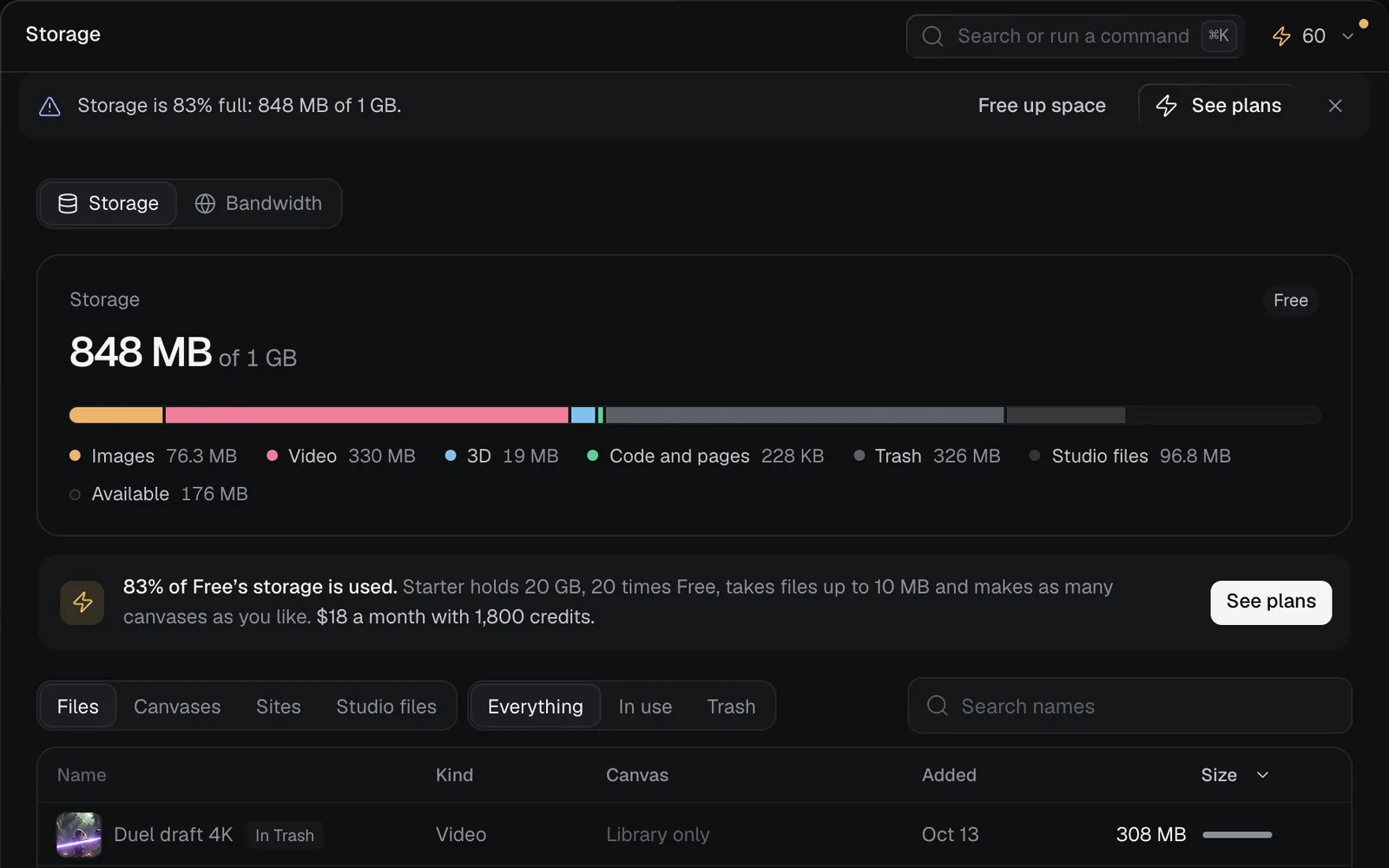
At the top, how much you use of your plan's storage ("1.1 GB of 20 GB") and your plan's name. The bar below splits it into parts: Images, Video, 3D, Audio, Code and pages, PDFs, Sites, Older versions, Trash, Studio files and more, each with its size, then what's Available. Click a part in the key to list only those files.
Below the bar, choose what to list:
| Show | What it lists |
|---|---|
| Files | Every file: Everything, In use, Older versions or Trash |
| Canvases | Each canvas and what its files take; click one for its files |
| Sites | Each site folder (the tab says how many): its files, when it was added, its size |
| Studio files | Canvas pictures, image edit masks, the team logo and runs' other files |
- Files list largest first, with their Name, Kind, Canvas, Added date and Size. Click a column's head to sort by it; click again to reverse.
- Search names finds files by name, however large your library.
- Click a file to select it, ⇧-click for a range and ⌘-click to add or remove one; ↑ and ↓ move, Enter opens and Esc clears.
- Right-click a file, or click its ···, for Open, Show on canvas, and Move to Trash, or Restore and Delete forever for a file in the Trash.
Free up space
- On the Storage page, click Trash in the bar's key (or Trash above the list). The files in the Trash show, with Empty Trash and what it frees at the bottom ("Empty Trash · 436 MB").
- Check nothing there is still needed: select a file and click Restore to bring it back.
- Click Empty Trash · 436 MB. "Empty the Trash?" says how much it frees; click Empty Trash.
"Deleted 3 files forever" confirms it, and the total drops at once. To delete only some files, select them in the Trash and click Delete forever, or press ⌘⌫.
- Deleting forever can't be undone. Nodes on canvases that showed a file, and versions that were it, show it as missing.
- To make room fast, start with the largest files: the list starts with them. Move what you don't need to the Trash (⌘⌫ on a selection), then empty it.
- You can delete forever your own files, or anyone's in a workspace you own.
- A site folder's files are deleted from Sites: click its ···, then Delete files. A page made from that folder stops finding its scripts, pictures and fonts.
- The Library's Trash has Empty Trash too; see Files and the library.
The Bandwidth page
Bandwidth is what's sent each time a file loads. It counts the month's use against your plan and starts again on the 1st (UTC).
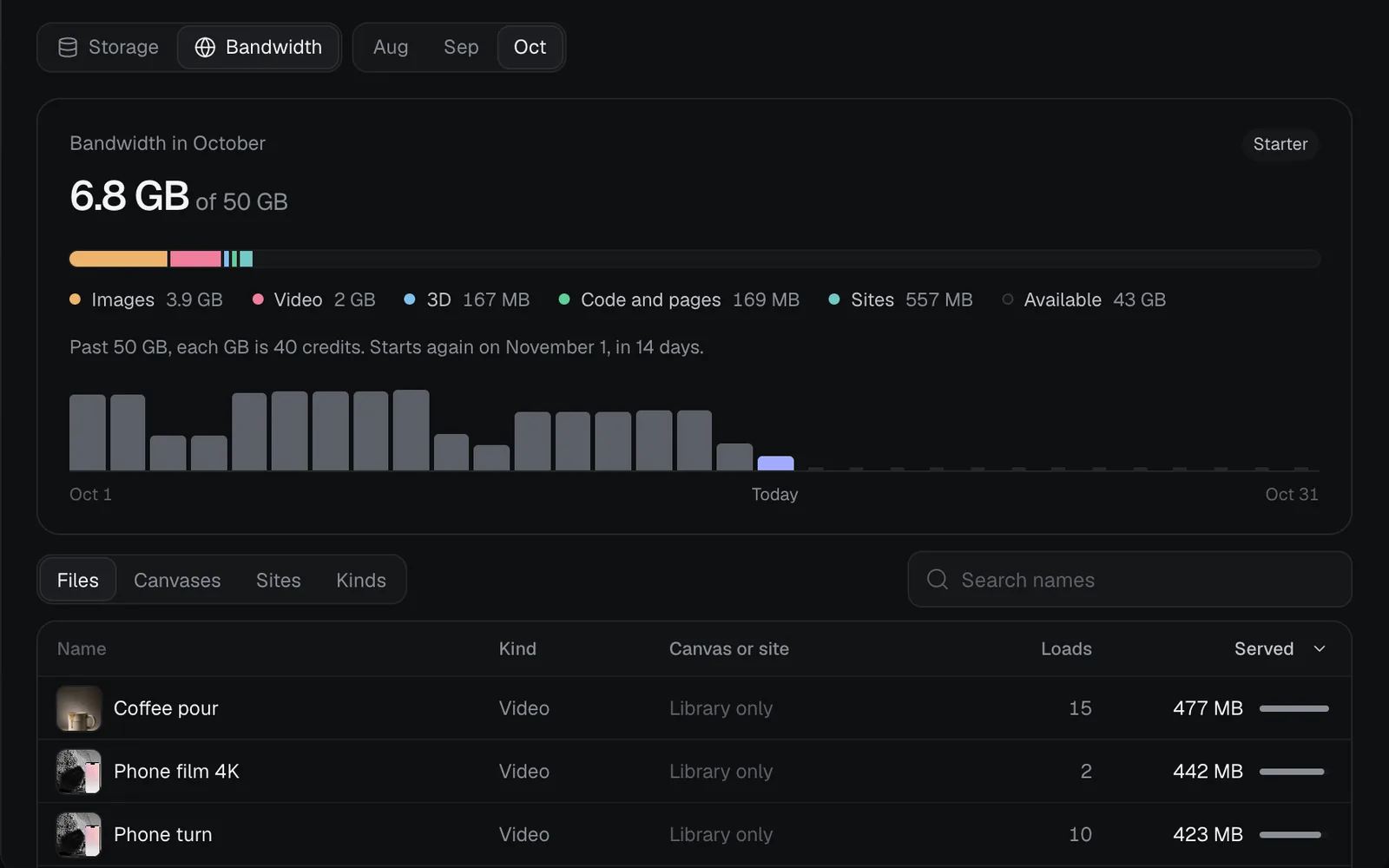
- The bar splits the month by kind: Images, Video, 3D, Code and pages, Sites and Deleted files. Below it, a bar for each day; hover one for its date, size and loads.
- Earlier months sit beside Bandwidth at the top (Aug, Sep, Oct) once there's history.
- List it by Files (Name, Kind, Canvas or site, Loads, Served), Canvases, Sites or Kinds.
What counts as bandwidth
- Your files loading in the studio, yours included: on Home, on canvases, in the Library and the full view.
- Files on a canvas you shared, as the people on it see them.
- Your published sites' pages and pictures, as their visitors load them.
- A file shown again soon after is sent from the browser's cache and isn't counted twice.
- What Fil's server fetches itself, such as the pictures it sends to a model, doesn't count.
Each plan's limits
| Plan | Storage | Bandwidth a month |
|---|---|---|
| Free | 1 GB | 1 GB |
| Starter | 20 GB | 50 GB |
| Pro | 50 GB a seat | 100 GB a seat |
| Max | 200 GB a seat | 250 GB a seat |
Pro and Max are a team's, and pool every seat's room. Each file you upload is limited too: 1 MB on Free, 10 MB on Starter, 50 MB on Pro and 100 MB on Max. See Credits and plans.
When you reach a limit
At 80% and 90% of your storage or this month's bandwidth, and again past it, a bar under the top bar says so, with Free up space (it opens the Trash) and See plans on Free or Buy credits on a paid plan. Its ✕ hides it for this session. On Free, the Storage and Bandwidth pages also say what Starter holds.
| Free | Starter, Pro and Max | |
|---|---|---|
| Storage full | Uploads stop and runs wait | Past the allowance: 3 credits a GB a month |
| Bandwidth used up | Files stop loading until the 1st | Past the allowance: 40 credits a GB |
- On Free, a full storage says "Your storage is full: Free holds 1 GB." Nothing stored is touched: delete files in the Trash forever, or move to Starter.
- On Free, with the month's bandwidth used, pictures show "limit reached" and other files don't load until the 1st. A published site says it's temporarily unavailable.
- On a paid plan, the extra is paid from your credits: storage a little each day, and bandwidth for each GB begun past the allowance. Your credit history shows them as "Storage over the allowance" and "Bandwidth over the allowance". With no credits left for it, uploads and runs wait, and files stop loading until the 1st.
What's next
- Files and the library: upload, find and restore files.
- Credits and plans: more room with Starter, Pro or Max.
- Publish a website: sites, their size and their visitors.
- Profile and settings: the account menu and your settings.